Construction Daily Log: What to Include and How to Write It Faster
A construction daily log is your best record of what happened on site. Here's what to include, what a late or missing log costs you, and how Vedo drafts it from the site walk for you to check and send.
It's 6:40 PM. The site is quiet, the trades are gone, and the daily log is still blank. You remember the rain at ten, the lumber that came short, the electrician who didn't show until after lunch. You'll write it up tonight. Or tomorrow morning. Or Friday, for the whole week.
Three months later, the framing sub sends a delay claim for the week of March 12. Your log for March 12 says "Framing, L2." That's all it says.
The construction daily log is the most important record a site produces, and the one most often written late, from memory, or not at all. This guide covers what to include in a construction daily log, why a late or thin log costs you when something goes wrong, how to write it faster, and how Vedo drafts it from the site walk you already do.
What is a construction daily log?
A construction daily log is the written record of one day on one site: who was there, what got done, what arrived, what went wrong and what was decided. It's also called a daily construction report, a superintendent's daily report or a site diary. On most jobs the superintendent writes it and sends it to the project manager, and it goes into the project file.
It's not paperwork for its own sake. When there's a dispute about a delay, a back-charge or a change, the daily log is often the only record made on the day it happened.
What to include in a construction daily log
A good daily construction report answers the same questions every day, in the same order:
- Date, site and who wrote it. Every page, so a printed copy still makes sense on its own.
- Weather and site conditions. Not just "rain." When it started, how long it lasted and what it stopped: "Rain 10:00 to 13:30, no exterior work, east lot too wet for the boom lift."
- Crew on site, by trade. How many people from each trade, and their hours. Note who didn't show.
- Work done, by area. Level, unit or lot, and what was finished or started. Quantities beat adjectives: "L2 Units 201 to 204 framed, 205 started," not "framing progressing well."
- Deliveries. What arrived, when, and what was short or damaged.
- Equipment. What was on site and what broke down.
- Inspections and visitors. Who came, what they looked at and the result.
- Delays and their cause. Every day the delay continues, not only the first day.
- Instructions and changes. Anything you were told or told someone to do differently, especially if it was said out loud and never written anywhere else.
- Safety. Incidents, near misses and hazards found and fixed.
- Deficiencies. New items for the punch list and who has them.
- Photos. With the time and the place, so they prove something on their own.
Why a late daily log costs you
It loses weight when you need it most
Construction lawyers make the same point again and again: in a delay claim, records made at the time are the best evidence there is. Site diaries, photos, emails and timesheets from the day carry more weight than anyone's memory or a schedule rebuilt months later (RDJ, Fenwick Elliott). A log written on Friday for the whole week is weaker than one written each day. A missing day is the first thing the other side will ask about.
It costs the office time
In the FMI and PlanGrid study of 600 construction professionals, people spent 5.5 hours a week looking for project information (Construction Dive). A thin daily log is a big part of that. The project manager calls the super, the super scrolls through the camera roll, and both lose twenty minutes on something that should have been one line in the log.
Bad records turn into rework
Autodesk and FMI surveyed more than 3,900 construction professionals and estimated that decisions made on bad data cost the industry $88.69 billion in rework in 2020, about 14% of all rework that year (Construction Equipment). A daily log that doesn't say what was actually done, or where, is bad data.
Why daily logs get written late
None of this is news to a superintendent. The log gets written late because of when it has to be written: at the end of a ten-hour day, after the last trade leaves, from memory and a camera roll. The facts were all there during the day. The super saw the rain, counted the crew, checked the delivery and talked to the inspector. The work is getting it out of their head and into the right boxes, every single day.
How to write a better construction daily log, faster
- Write it as the day goes. A line after each walk, delivery or visit takes seconds. The whole day at 6:40 PM takes half an hour.
- Use the same template every day. The same sections in the same order. Nothing gets skipped, and anyone can read it.
- Count, don't describe. Numbers of people, units, metres and loads. "Good progress" means nothing in a dispute.
- Record a delay every day it lasts. A delay written down once can look like a one-day problem later.
- Write down what was said. Verbal instructions are the hardest thing to prove later and the easiest to note on the day.
- Add photos with a time and a place. "L3, Unit 304, bath" on the photo, not just in your head.
- Send it the same day. A log the project manager reads tonight can change what happens tomorrow.
How Vedo drafts the daily log from your site walk
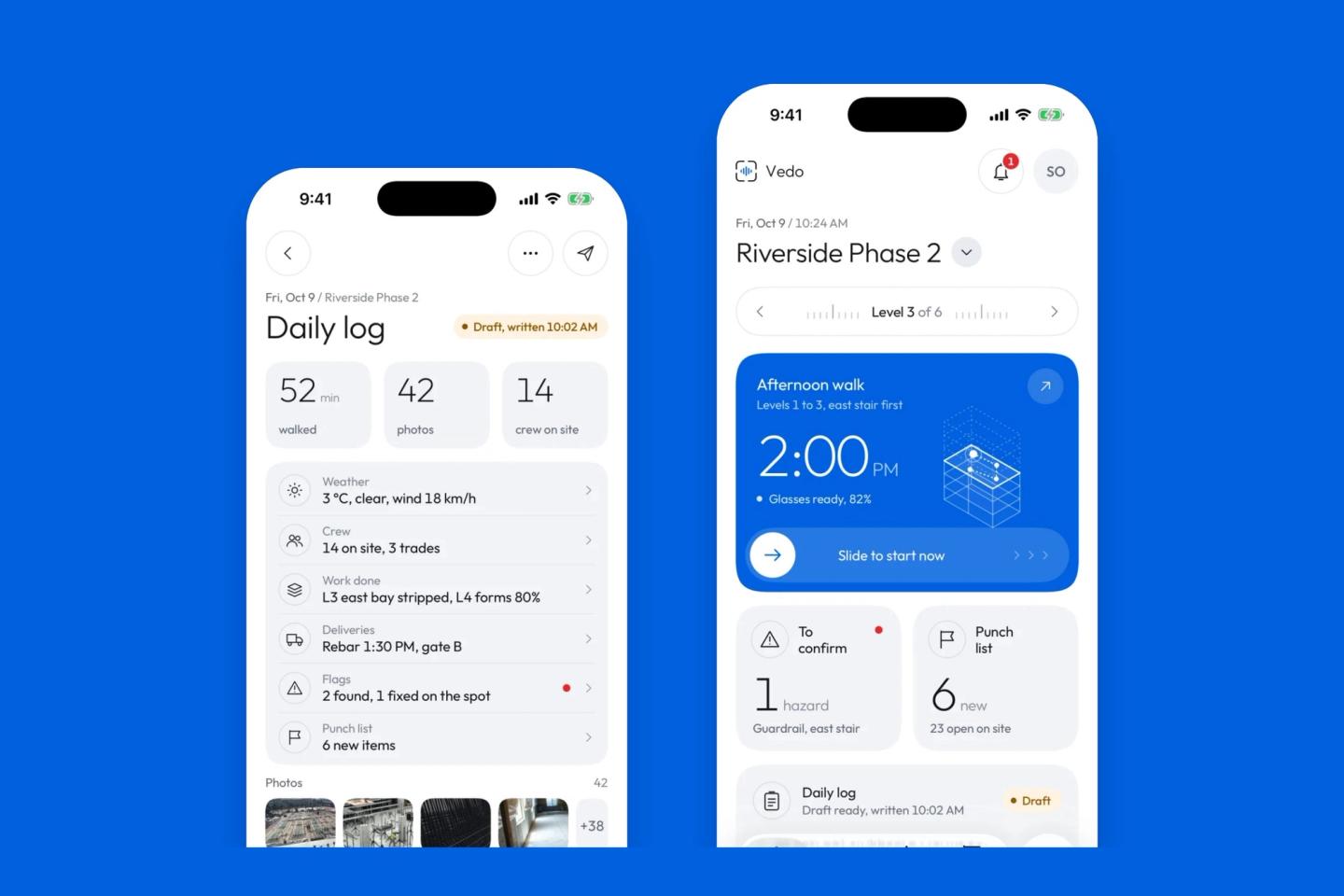
Vedo turns the walk you already do into the first draft of the log, so the end of the day becomes reading and sending instead of writing.
It writes the draft after each walk
Walk the site with Vedo recording on Meta AI glasses or your phone, and talk the way you normally would. When the walk ends and Vedo has finished going through it, the day's daily log is drafted. Walk again in the afternoon, and the draft is rewritten to include it. Anything you've already edited stays the way you left it.
It fills the sections from what happened
- Work done is written from what you said on the walk.
- Deliveries come from the deliveries entered in the app and what you said about them.
- Crew comes from the trades checked in on the app, with their headcounts and hours.
- Flags and Punch list list the day's hazards and new deficiencies, including the ones Vedo found on the walk video.
- Photos: Vedo picks up to eight of the day's photos, each with its time and level.
There's a weather section too, and you can add your own sections, such as Inspections or Visitors. Vedo is told to write only from the facts the walk and the app recorded. It doesn't invent names or numbers.
You read it, fix it and send it
Edit any section by typing or by voice, then tap Approve and send. Nothing goes until you do. The project managers on the site, or the people you choose, get the log by email with a PDF attached. The PDF has the sections, the photos with their time and level, every voice note with its time, place and words, the flags with their status, and who sent it and when on every page. If it hasn't gone by the end of the day, Vedo reminds you.
Once it's sent, it's locked
A sent log can't be quietly changed. If something needs correcting, you amend it, and the change goes out as a new version with its own history: sent, approved, returned, amended. A project manager can approve the log, or send it back with a comment, from the Vedo app.
What Vedo won't do
- It only knows what the walk and the app recorded. If a trade wasn't checked in, it isn't in the crew count. If you didn't mention the inspector's visit, it isn't in the log. Say it on the walk, or add it before you send.
- It can get things wrong. Read the draft before you send it. Your name goes on it, not ours.
- It doesn't replace a notice. A daily log records a delay. It isn't the written notice your contract may require. Follow your contract's notice clause, and ask your lawyer when it matters.
Try it for one week
For one week on one site, let Vedo draft the daily log from your walks. Each evening, compare it with what you would have written, and time how long it takes you to check it and send it. At the end of the week, look at what the project manager got: a log every day, the same day, with photos.
If you want to try it on one of your sites, book a demo or join the waitlist. And if the hardest part of your day is the punch list, read How to Make a Punch List Faster.
Frequently asked questions
What is a construction daily log?
A construction daily log, also called a daily construction report or site diary, is the written record of one day on one site: weather, crew, work done, deliveries, inspections, delays, instructions, safety and photos. The superintendent usually writes it and sends it to the project manager.
What should a daily construction report include?
The date and site, weather and site conditions, crew by trade with hours, work done by area, deliveries, equipment, inspections and visitors, delays and their cause, instructions and changes, safety incidents and hazards, new deficiencies, and photos with a time and place.
Who writes the daily log on a construction site?
Usually the site superintendent, or an assistant super on larger jobs. Some contracts also ask the project manager or the owner's representative to review or sign it.
How long should you keep construction daily logs?
At least as long as a claim about the work could still come up, which depends on your contract and your province or state. New home warranties can run for years: in Alberta, the structural warranty lasts 10 years (Government of Alberta). Check with your lawyer for your own jobs.
Is a daily log the same as a site diary?
Yes. Daily log, daily report, daily construction report, superintendent's report and site diary all describe the same record. The name changes by company and region more than the content does.
Sources
- RDJ, Evidencing construction delay claims: the importance of maintaining site records
- Fenwick Elliott, Practical tips for putting claims together
- FMI and PlanGrid, Construction Disconnected (2018), via Construction Dive
- Autodesk and FMI, Harnessing the Data Advantage in Construction (2021), via Construction Equipment
- Government of Alberta, New home warranty overview
- Photos from Unsplash: Troy Mortier, Jack Charles, Jens Behrmann and Jairo Rojas