How to Make a Punch List Faster (Without the Write-Up After the Walk)
Every site walk ends with a write-up: photos to sort, places to remember, trades to pick. Here is where that time goes, how to cut it, and how Vedo turns the walk itself into a punch list you review and assign.
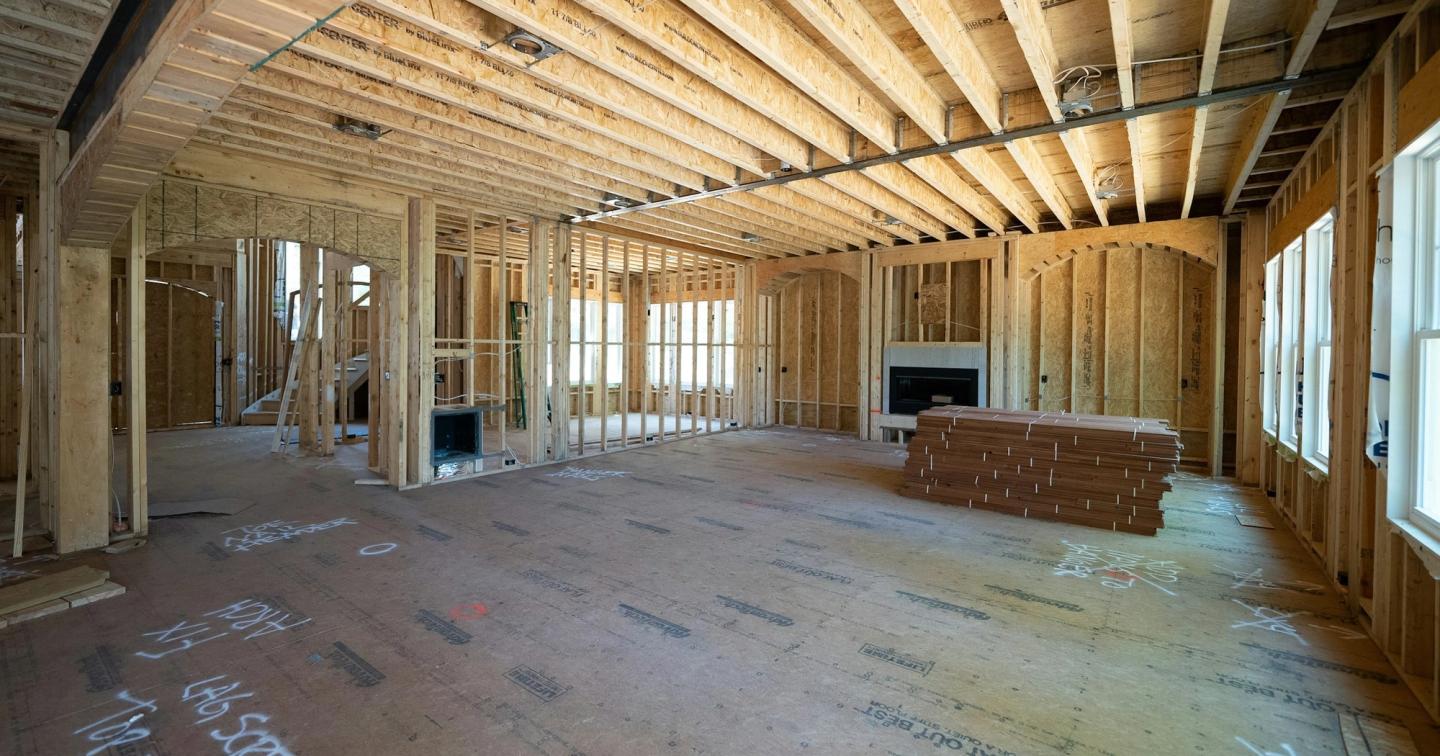
The walk is done by ten. You saw twenty things worth fixing: a missing nail plate, a tear in the vapour barrier, a damaged drywall corner, a pipe sleeve with no firestop. You took forty photos and said a few things out loud to nobody in particular.
Now comes the part nobody counts. Which photo was Unit 304 and which was 306? Was that corner on Level 2 or Level 3? Is the bath fan duct the electrician's or the HVAC sub's? Every item has to be found, placed, described, given to a trade and sent. Most supers do it in the truck at lunch, or at the kitchen table after supper.
That's the punch list write-up. It's slow, it's easy to put off, and when it's late, the trade hears about the problem after the next trade has already covered it. This guide covers what the write-up really involves, what it costs beyond the time, how to make a punch list faster with what you have today, and how Vedo turns the walk itself into a punch list you check instead of write.

What goes into writing up a punch list
A good punch list item has five parts: where it is, what's wrong, which trade fixes it, a photo, and when it's due. Getting from a walk to that list means doing this for every item:
- Find the photo. Scroll the camera roll for the right shot among forty that look alike.
- Place it. Level, unit, room, wall. From memory, hours later.
- Describe it. Short enough to read on a phone, clear enough that nobody has to call you about it.
- Pick the trade. Easy for a cracked tile. Harder for a hole in the vapour barrier that two trades walked through.
- Set a due date. Before insulation, before drywall, before the homeowner's walkthrough.
- Send it. By text, email, PDF or project software, one trade at a time.
- Chase it. Ask if it's done, go and look, then close it or send it back.
Steps 1 to 4 are the write-up, and they're where items get lost. A photo with no note is just a photo. A note with no photo turns into a phone call. And the item you meant to add and didn't is the one that comes back as rework.
How much time the punch list write-up takes
Nobody has measured punch list write-up time across the industry, and we won't make up a number. What has been measured is how much of the week goes to work that doesn't move the job forward. In the FMI and PlanGrid study of 600 construction professionals in the US, Canada, the UK, Australia and New Zealand, people spent 35% of their working time, more than 14 hours a week, on it (Construction Dive, FMLink):
- 5.5 hours a week looking for project information
- almost 5 hours a week resolving conflicts
- nearly 4 hours a week dealing with mistakes and rework
A late or patchy punch list feeds all three. The trade goes looking for information you meant to send. An argument about who caused a problem starts because the photo has no time or place on it. And the fix arrives after the work is covered. The same study traced 48% of rework on US jobsites to miscommunication and poor project information.
Do the math on your own walks
The quickest way to know your own number is to time it. Here is the math, with made-up numbers:
- Items on a walk: say 20
- Minutes to write each one up properly: say 3
- Walks a week: say 5
That's an hour a walk and five hours a week, before anyone has fixed anything. Your numbers will be different. Time one write-up this week, from the end of the walk to the last item sent, and you'll have them.
Why a slow write-up costs more than time
Late items get covered. A firestop that takes five minutes before drywall takes a cut, a patch and three trades after it. We worked out what that costs in The Cost of Rework in Construction.
Items go missing. A write-up done from memory loses things. What you saw and didn't photograph, or photographed and didn't note, never makes the list.
Vague items cause return trips. "Fix the outlet in 304" sends the electrician to the wrong wall. Without a photo, an exact place and one clear line, the trade guesses, calls you, or comes back twice.
Nobody can prove it later. A photo in your camera roll isn't a record. When a back-charge or a warranty claim comes up months later, you need the photo, the time, the place and who fixed it.
There's more of it every year. BuildForce Canada expects about 21% of the residential construction workforce, roughly 135,000 people, to retire by 2035 (CHBA). Fewer supers covering more homes means more walks, more items and more write-ups for each person.
How to make a punch list faster today
You can cut write-up time without new software. These habits work on any site:
- Write it up where you're standing. Photo, then one line, right there. On site it takes seconds. Later it takes minutes per item, and some never get done.
- Take two photos. One close, and one wide enough to show where it is. The wide shot saves the trade a phone call.
- Use the same order every time. Level, unit, room, then what's wrong: "L3, Unit 304, bath: fan duct not connected." Every trade reads it the same way.
- Sort by trade, not by room. A trade only needs their own items. Send each trade one list, not a stream of texts.
- Send it the same day. An item sent tonight can be fixed tomorrow, before the next trade shows up.
- Ask for an after photo. Close an item when you've seen the photo or the fix, not when someone tells you it's done.
These habits help. But they still ask you to stop at every item, take the photos, type the line and sort it all later. On a busy walk, that's the part that slips, and it's the part we built Vedo to take off your hands.
How Vedo turns the site walk into a punch list
Vedo doesn't add a step to your walk. It records the walk you already do, finds the items in it, and writes each one up for you. Your job changes from writing the list to checking it.
1. Walk and talk the way you already do
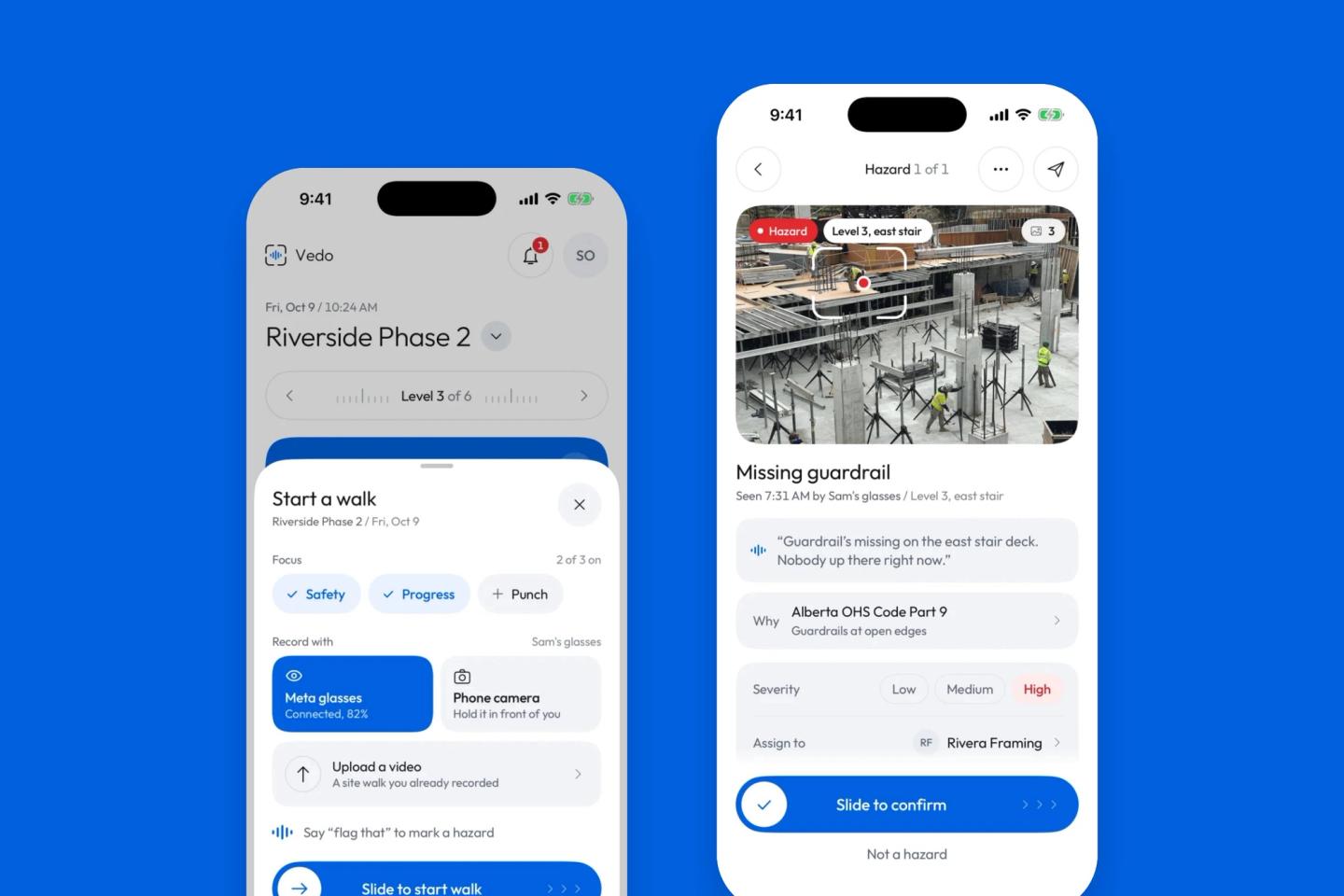
Start a walk in the Vedo app and choose how to record it: Meta AI glasses, your phone's camera, or a video of a walk you already shot. Walk the site and talk the way you normally would. When you want to mark something, say "flag that" or "punch", and Vedo takes a photo right then and keeps your words with it. Where your site requires safety glasses, use the phone.
2. Vedo finds the items, including the ones you didn't mention
While you walk, Vedo reviews each minute of the recording, about one frame every two seconds, together with what you said. It looks for construction defects and unfinished work a trade needs to fix, and for safety hazards. Items start showing up in the app as the walk goes, often while you're still on site. It flags what it sees even when you walked past without a word.
3. Each item arrives already written up
Every item comes with the things you'd otherwise put together yourself:
- A short title, like "Fire caulk missing at pipe".
- The photo, with the spot framed when Vedo can tell where it is in the picture.
- The moment in the walk video. Tap the item to go back to it.
- The level or unit, worked out from what you said, what the camera saw and your phone's barometer.
- The trade it most likely belongs to.
- What you said, if you said anything.
Repeats are grouped, so five cracks on one wall are one item, not five. Something still open from an earlier walk is added to that item instead of being made again. Small cosmetic things go to a quiet low-priority list on the walk summary. Nothing is deleted, and nothing pings you about them.
4. Check the list while it comes in
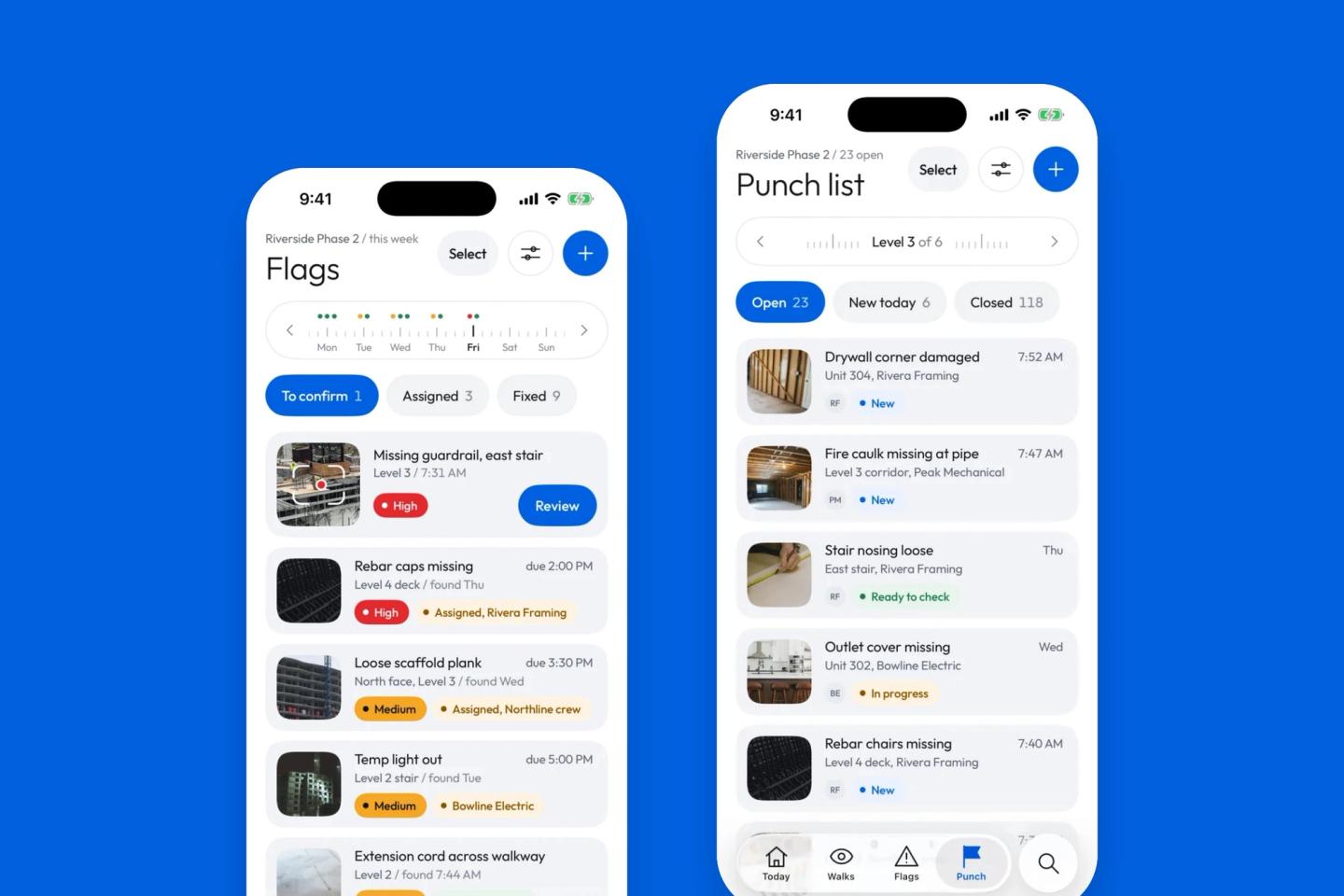
Defects land on the punch list as new items, sorted by level and trade. Hazards wait under "To confirm" on the Flags tab until you look at them. As items come in, you can change the trade or the due date, edit the details, or delete an item that isn't real. A hazard that isn't one gets "Not a hazard", and the reason is kept.
You don't have to go one by one. Tap Select, pick the items (or Select all), and act on them together: confirm hazards, assign a trade, mark items fixed or close them. Every group action has Undo.
5. Each trade gets its items when the walk ends
When the walk ends and Vedo has merged the repeats, each trade gets one email listing its new punch items from that walk, with where each one is and a link to the trade's own page. The page shows the photos, and the trade marks items fixed there. No app to install, no login. Hazards go to a trade when you assign them.
If an item went to the wrong trade, move it. Select the items for one trade, tap Assign a trade, pick the trade, and they move together. The new trade is told. A walk with a few wrong trades takes a few taps, not twenty write-ups.
6. The trade closes it with a photo, and you check it
The trade fixes the item and marks it done with an after photo. You see it as Ready to check. Close it, or send it back with a reason the trade can see. Before drywall, before paint and before the homeowner's final walkthrough, the punch list shows what's still open.
The punch list write-up, by hand and with Vedo
- Find the photo. By hand: scroll the camera roll. With Vedo: the photo is on the item, framed on the problem.
- Place it. By hand: from memory. With Vedo: the level or unit, from what you said, the camera and the barometer.
- Describe it. By hand: type it. With Vedo: a short title is written for you, and you can change it.
- Pick the trade. By hand: decide each one. With Vedo: the likely trade is filled in, and you move the ones that are wrong.
- Send it. By hand: a text or email per trade. With Vedo: each trade gets one email with its items when the walk ends.
- Chase it. By hand: calls and site visits. With Vedo: New, In progress, Ready to check and Closed, with the after photo.
What Vedo won't do
We'd rather you hear this from us:
- It only knows what the camera saw and what you said. It can't see inside a closed wall, a dark room or a blurred frame, and if you walk past something quickly it may miss it. That's why the walk before insulation and drywall matters most.
- It will be wrong sometimes. A wrong trade, an item that isn't a deficiency, something it didn't catch. Punch items go to their trades when the walk ends, so look over the list as items come in, and fix or delete anything that's wrong.
- The time it saves depends on that. If Vedo flagged a lot of things that aren't real, you'd spend the time deleting them instead of writing them. That's why small or unclear things go to the quiet list, and repeats are grouped.
- Moving items in bulk is one trade at a time. "Assign a trade" sends the chosen items to one trade. Items for three trades take three passes.
- We won't promise you a number of hours. The honest way to know is to time it on your own walks.
Time it on one walk
Pick one walk this week. Write it up the way you always do, and time it from the end of the walk to the last item sent. On your next walk, record it with Vedo and time how long it takes to check the list. Then compare three things: the minutes, the number of items on each list, and how many items Vedo found that you never wrote down.
If you want to try it on one of your sites, book a demo or join the waitlist.
Frequently asked questions
What is a punch list in construction?
A punch list is the list of work that doesn't yet meet the drawings, the spec or the quality standard: defects, damage and unfinished items a trade needs to fix. In Canada it's often called a deficiency list. Supers keep one through the whole build, not only at the end.
What should a punch list item include?
Where it is (level, unit and room), what's wrong in one line, the trade that fixes it, a close photo and a wide one, a due date, and its status. When it's fixed, add an after photo.
How long does it take to write up a punch list?
It depends on how many items a walk turns up and how much you write down on site. No study measures it across the industry. The simple way to know is to time one write-up, from the end of the walk to the last item sent.
Can AI make a punch list from a site walk?
AI can review the video and photos from a walk, together with what the super said, and draft the items: the photo, the place, a title and the likely trade. A person still needs to check the list, because AI can't see what the camera didn't, and it can be wrong.
How do you send a punch list to subcontractors?
Sort it by trade and send each trade only their items, with a photo and the exact location, on the day you find them. Use one list rather than a string of texts, and ask for an after photo so you can close each item without another trip.
Sources
- FMI and PlanGrid, Construction Disconnected (2018), via Construction Dive and FMLink
- BuildForce Canada residential outlook (July 2026), via the Canadian Home Builders' Association
- Photos from Unsplash: Samuel Cruz, Alena Plotnikova, Rosemary Media, Agustín Pimentel, Jimmy Nilsson Masth and Troy Mortier