Field to Office Communication: How Project Managers See the Site
Project managers spend hours chasing what happened on site. Here's what the office needs from the field each day, how to close the gap without more phone calls, and how Vedo gives the office the site's own record.
A project manager running six homes and a small apartment building starts the day with three questions. Is Lot 14 ready for the framing inspection on Thursday? Did the rebar for the parkade come? Did anyone fix the guardrail on the east stair?
They call the super. The super is on a ladder and calls back at lunch. The rebar question goes to a text, the text gets buried, and by three o'clock the project manager is driving forty minutes to see for themselves.
That's the gap between the field and the office, and every builder and general contractor knows it. This guide covers what it costs, what a project manager actually needs from the site each day, how to close the gap without more phone calls, and how Vedo gives the office the site's own record.
What poor field to office communication costs
The numbers are hard to ignore. In the FMI and PlanGrid study of 600 construction professionals in the US, Canada, the UK, Australia and New Zealand, people spent 5.5 hours a week looking for project information, and 48% of rework on US jobsites was traced to miscommunication (26%) and poor project information (22%) (Construction Dive, FMLink).
A later study by Autodesk and FMI, of more than 3,900 construction professionals, estimated that bad project data cost the industry $1.85 trillion worldwide in 2020, including $88.69 billion in rework, about 14% of all rework that year (Construction Equipment).
Behind those numbers are ordinary days: the office deciding with yesterday's information, the site waiting on an answer, and a fix that lands after the work is covered.
What a project manager actually needs from the site
A project manager doesn't need every photo or every word said on the walk. They need the answers, every day, in the same place:
- What got done today, by area, in numbers.
- What's wrong, and who has it. Hazards, deficiencies and the trade assigned to each.
- What's late or blocked, and why.
- Proof. A photo with a time and a place when something matters.
- What arrived, and what didn't.
- What the homeowner or owner was told, if anything.
- The same list the super and the trades see, not a summary of it.
Why phone calls and texts don't scale
Calls and texts work on one site with one super who's always free to answer. They break down as soon as there's more than that.
- They interrupt the person doing the work. The super stops the walk to answer, and the walk is where things get caught.
- They leave no record. What was said on the phone is gone. What was texted is buried.
- The information lives with one person. When the super is sick, on holidays or changes jobs, the office loses its eyes.
- There are fewer people to ask. BuildForce Canada expects about 21% of the residential construction workforce, roughly 135,000 people, to retire by 2035 (CHBA). Fewer supers will cover more homes, and the office will lean on each of them more.
How to tighten field to office communication
- One daily log, the same day, the same format. It's the backbone of construction communication. If it arrives at 10 PM or on Friday, the office is always behind. See Construction Daily Log: What to Include and How to Write It Faster.
- One list for deficiencies and hazards. Not texts, not a whiteboard in the trailer. One list the office can read too.
- Photos with a place. "L3, Unit 304, bath," so the office doesn't have to call to ask where.
- Agree what needs a call. A safety problem or a stopped pour, call. Everything else goes in the log or the list.
- Give the office access to the record, not just a summary. A project manager who can look for themselves stops calling to ask.
- Look at open items by trade once a week, together, before they turn into return trips.

How Vedo gives the office the site's record
Vedo records the super's site walks, finds the hazards and deficiencies in them, and writes the daily log. Here's what the office gets out of that.
Give each person access to their sites
Invite people by email with their role (project manager, site super, assistant super or coordinator) and the sites they work on. You can change a person's role, switch sites on or off for them, or remove them at any time. Someone at your company's email address can ask to join, and an owner or admin approves them and picks their sites. Nobody gets in just because of their email address.
The daily log comes to the office every day
When the super sends the day's log, the project managers on the site, or the people you choose, get it by email with a PDF attached: work done, crew, deliveries, the day's flags and new punch items, and photos with their time and level. A project manager can approve the log or send it back with a comment from the Vedo app. Once it's sent, it's locked, and any change goes out as a new version.
The office sees what the super sees
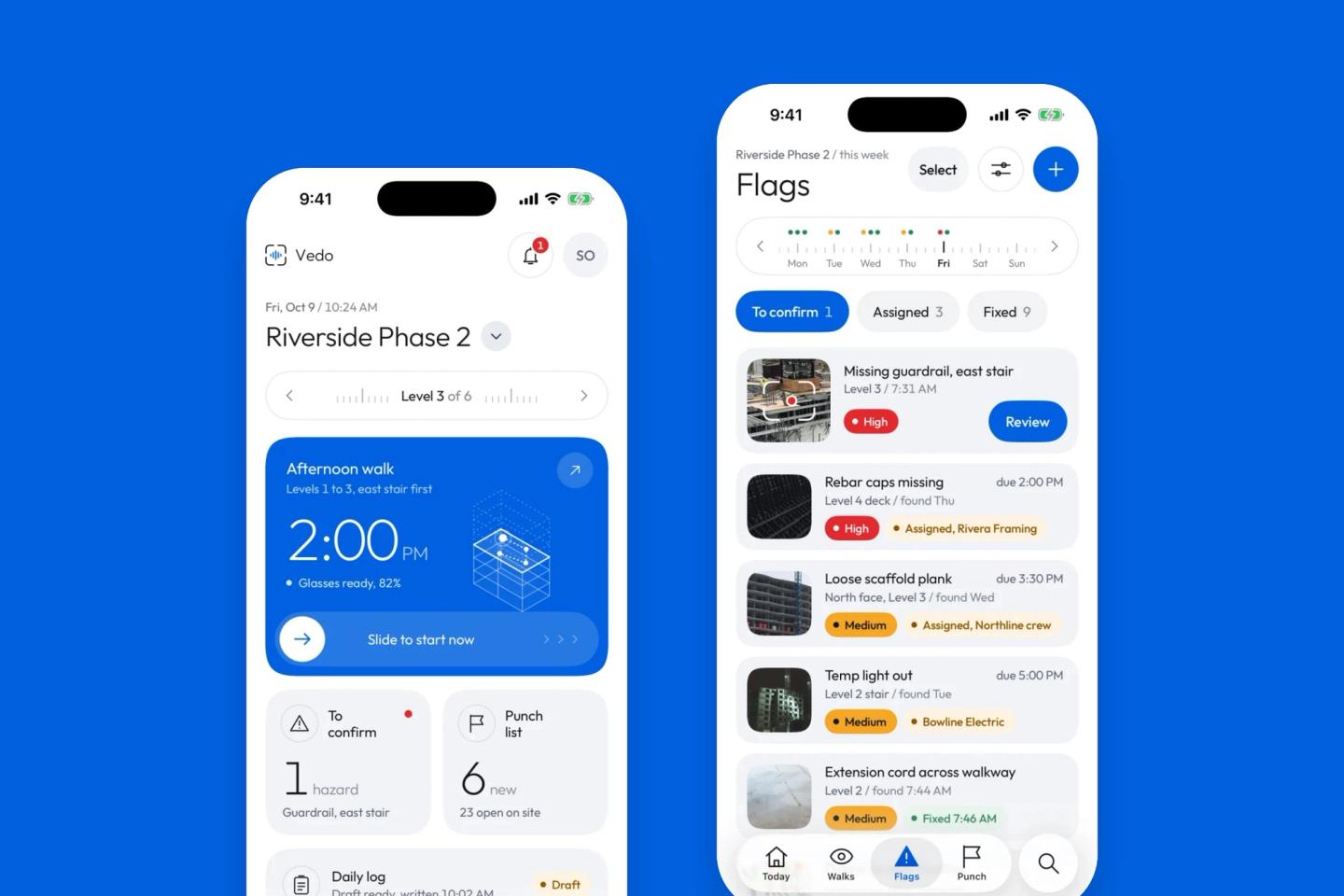
A project manager uses the same Vedo app as the super. For each site they can see:
- Today: what's waiting to be confirmed, the punch list count and the day's log.
- Walks, with a replay of the walk video. Every flag opens the replay at the moment it was found.
- Flags, with who has each hazard and when it's due.
- The punch list, by level and trade, with where each item stands.
- Photos, by day and level.
The site list shows every site you're on, with the one thing on each that needs attention. Search can look across all your sites at once.
Homeowner messages reach the office too
On residential sites, a homeowner's replies reach the super and the project manager at the same time, and the project manager gets a copy of each weekly homeowner update. More on that in Construction Updates for Homeowners.
What Vedo won't do
- It's an iPhone app. There's no desktop dashboard today. The daily log arrives as an email and a PDF you can read on any computer, and everything else is in the app.
- It shows one site at a time. You switch between sites. Only search looks across all of them.
- It isn't a live camera. The office sees what the super's walks and the app recorded, not a feed from the site all day.
- It doesn't replace the call for urgent problems. Hazard alerts go to the site's supers. If something can't wait, call.
- It doesn't sync with Procore or other project software yet. The log and the punch list export as PDFs, and the punch list as a spreadsheet file (CSV).
Try it on one site
Pick one site. For two weeks, let the super walk it with Vedo, and have the project manager read the daily log each evening and check the flags and punch list in the app instead of calling. At the end, count the calls and the drives you didn't need.
If you want to try it on one of your sites, book a demo or join the waitlist.
Frequently asked questions
What is field to office communication in construction?
It's how information gets from the job site to the project manager and the office, and back: daily logs, deficiencies, photos, delays, deliveries, questions and decisions. Poor field to office communication means the office is working from old or missing information.
How can a project manager monitor a job site remotely?
Get a daily log from the super every day, the same day, in the same format, with photos that show the time and place. Use one shared list for hazards and deficiencies that the office can read too, and agree with the super what needs a phone call and what goes in the log.
What should a superintendent send the project manager each day?
The daily log: crew by trade, work done by area, deliveries, inspections and visitors, delays and their cause, instructions given, safety, new deficiencies, and photos. Sent the same day, so the project manager can act on it before the next morning.
How do you reduce miscommunication on a construction site?
Put the important things in writing, in one place everyone can see, on the same day. Use photos with a time and place instead of descriptions, send deficiencies to trades with the photo, and stop running the job through texts and calls that leave no record.
Sources
- FMI and PlanGrid, Construction Disconnected (2018), via Construction Dive and FMLink
- Autodesk and FMI, Harnessing the Data Advantage in Construction (2021), via Construction Equipment
- BuildForce Canada residential outlook (July 2026), via the Canadian Home Builders' Association
- Photos from Unsplash: ThisisEngineering, LeeAnn Cline, Shanjir H, Mina Rad and Marcus Reubenstein